How to Generate Fresh Ideas: Mind Mapping a New Perspective
One of the greatest limitations to creativity that we face is our tendency to only look at the world from our own, singular perspective. How often do you stop and consider an alternative viewpoint? Different people with diverse backgrounds, experiences, professions and interests will have different outlooks and opinions. Why not adopt another viewpoint to encourage your brain to produce original ideas? If you break the shackles of your narrow vision, ideas that were invisible from your own viewpoint will become clear.
Mind Mapping is ideal for this exercise as it triggers connections in the brain to spark further ideas. Using Mind Mapping software, such as iMindMap will allow you to get your ideas out of your brain and onto the page at lightning speed. Follow the three simple steps below to learn how to use Mind Mapping to borrow other perspectives when problem solving and generate creative ideas. In this article, we will use ‘low staff productivity’ as our example problem.
STEP 1: IDENTIFY DIFFERENT POINTS OF REFERENCE

 Next, start brainstorming. Work your way through each viewpoint and consider how your problem or challenge would be viewed in their mind-set. Ask a lot of questions, such as:
What factors would be important for this person?
How would their needs be different from mine?
How would these people tackle the challenge differently?
How would they describe this problem?
Add sub-branches to your Mind Map as ideas spring to mind, using one keyword per branch. Keywords are not as limiting as sentences and will trigger associations in your brain, sparking new ideas. Mind Mapping will draw out ideas, ensuring you explore all avenues. Be sure to highlight the similarities and differences in how each person would approach the problem. Use iMindMap’s Relationship Arrows to draw connections between your ideas and gain a thorough understanding of how each perspective impacts the others.

One of the greatest limitations to creativity that we face is our tendency to only look at the world from our own, singular perspective. How often do you stop and consider an alternative viewpoint? Different people with diverse backgrounds, experiences, professions and interests will have different outlooks and opinions. Why not adopt another viewpoint to encourage your brain to produce original ideas? If you break the shackles of your narrow vision, ideas that were invisible from your own viewpoint will become clear.
Mind Mapping is ideal for this exercise as it triggers connections in the brain to spark further ideas. Using Mind Mapping software, such as iMindMap will allow you to get your ideas out of your brain and onto the page at lightning speed. Follow the three simple steps below to learn how to use Mind Mapping to borrow other perspectives when problem solving and generate creative ideas. In this article, we will use ‘low staff productivity’ as our example problem.
STEP 1: IDENTIFY DIFFERENT POINTS OF REFERENCE
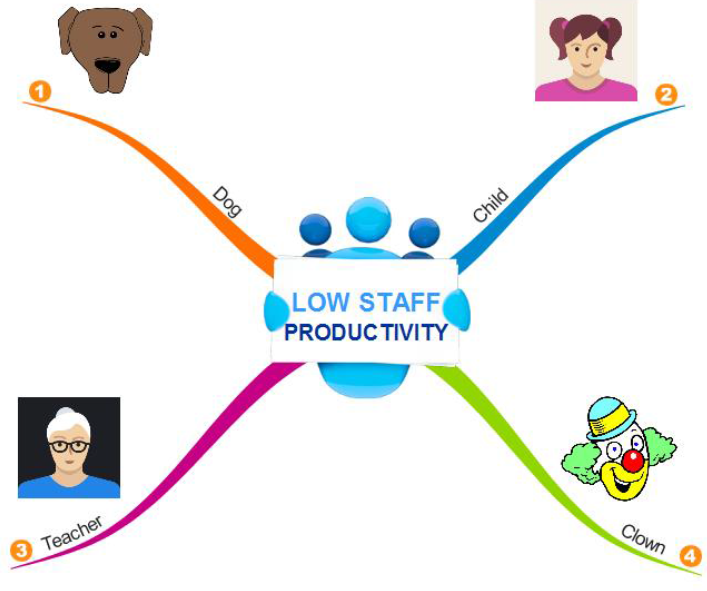
Start by identifying a range of different standpoints – use a random selection of people from different walks of life and circumstances. You could include people affected by the problem such as staff, clients or customers, or people totally unrelated to the problem. Ask yourself, how would an employee view this problem? A child? An environmentalist? A mathematician? The Queen of Hearts or even Ironman? Interestingly, the viewpoint that seems the wackiest or the most distant from your problem might actually give you the inspiration that you’re looking for. Remember, the more assorted your choices, the broader the base you will have for generating creative solutions.
Create a Mind Map like the one shown above, with the main branches representing the perspectives that you would like to explore. Colour code your branches to define and categorise each perspective. Colour coding engages the brain, linking the visual with the logical and helping your brain to create mental shortcuts. Try using images to represent each viewpoint as they convey more information than words and are processed instantly by the brain. iMindMap has a range of Branch Art designs and an extensive image and icon library.
STEP 2: EXPLORE EACH VIEWPOINT

What factors would be important for this person?
How would their needs be different from mine?
How would these people tackle the challenge differently?
How would they describe this problem?
Add sub-branches to your Mind Map as ideas spring to mind, using one keyword per branch. Keywords are not as limiting as sentences and will trigger associations in your brain, sparking new ideas. Mind Mapping will draw out ideas, ensuring you explore all avenues. Be sure to highlight the similarities and differences in how each person would approach the problem. Use iMindMap’s Relationship Arrows to draw connections between your ideas and gain a thorough understanding of how each perspective impacts the others.

STEP 3: GENERATE NEW IDEAS
Once you have exhausted all possibilities, reflect on your findings and use them to generate new and imaginative ideas for your problem. Ask yourself the following:
What ideas and approaches would this person have?
What actions are they likely to take?
Could their approach work in my situation?
Update your Mind Map as you generate new ideas surrounding each viewpoint. A Mind Map will give you a clear visual overview of your ideas, so you can quickly understand how they fit together. It will also highlight the gaps in your thinking so you know what areas need more focus, and make your brainstorm as thorough as possible. The beauty of iMindMap is that you can always go back and add in extra details as you develop your understanding of each perspective. Your canvas is unlimited, so you don’t have to worry about running out of space.
At the end of your brainstorm you will have a selection of creative solutions that might never have been clear to you from your own viewpoint. A fresh pair of eyes can always bring new possibilities to a situation where you thought you might have exhausted all options.
Comments
Post a Comment